Modern laptops often trade built-in ports for thinner designs. That can be inconvenient when a meeting room offers wired internet, or a USB-A mouse will not fit your computer. An Ethernet And Usb Adapter bridges that gap by adding a wired network connection and one or more USB ports through a compatible laptop connection. It is a small accessory, but it can solve a very specific problem. No magic.
A wired Ethernet connection may provide steadier performance than Wi-Fi, especially when wireless coverage is weak or crowded. USB ports let you connect practical devices such as a keyboard, flash drive, or webcam. For remote workers, students, and travelers, one adapter can reduce the need to carry several separate dongles. Still, results depend on the adapter, computer, network, and connected devices. Check the product’s supported USB standard, Ethernet speed, operating-system compatibility, and power requirements before buying. Some models need extra power when several devices are attached.
There is a trade-off: adapters add another item to pack, and a low-quality cable or hub can limit performance. A compact model may also block a neighboring port. Those details are easy to overlook. Consider where you will use it, which ports you actually need, and whether portability or extra connectivity matters more. The right choice is not necessarily the one with the most ports; it is the one that fits your setup reliably.
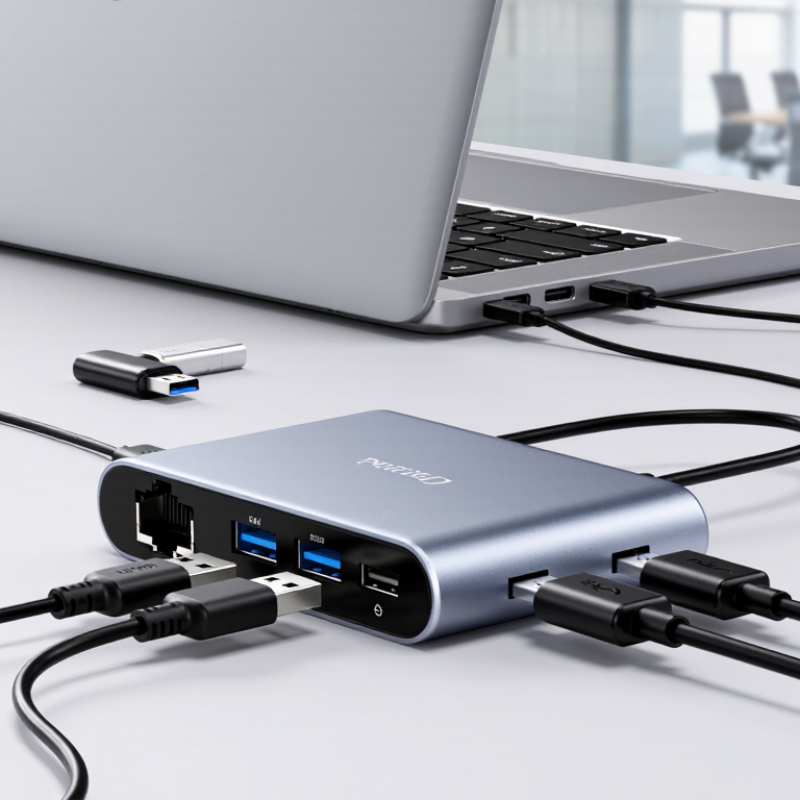
An Ethernet and USB adapter is a compact bridge between two connection systems. It links a computer’s USB port with a wired Ethernet cable. The adapter contains a network controller, a USB interface, and an RJ45 socket. USB carries data to the adapter. Ethernet then sends that data through the cable. It is a translator. This design helps laptops, tablets, and compact computers connect when they lack a built-in network port.
Technical limits matter. The USB Implementers Forum defines USB 3.2 Gen 1 at up to 5 Gbps and Gen 2 at up to 10 Gbps. These are theoretical rates, not promises. IEEE 802.3 documentation defines 1000BASE-T Ethernet at 1 Gbps over suitable twisted-pair cabling. The slower link controls the practical result. A fast adapter cannot repair an old cable, crowded network, or weak router. Speed labels can mislead.
In daily use, an adapter can reduce wireless interruptions during video meetings, large file transfers, or software deployment. Network technicians often test it with a known cable before changing settings. That simple step prevents false diagnoses. Power consumption also varies between models, especially during sustained transfers. One assumption deserves doubt: wired does not always mean faster. A damaged port, poor driver support, or a USB hub can create delays. The adapter is useful, but it is not magic.
An Ethernet and USB adapter turns a USB port into a wired network interface. Inside, its controller translates USB data into Ethernet frames. A cable then carries those frames to a switch or router. The device receives a network identity through DHCP, usually including an IP address, gateway, and DNS settings. The path is simple.
In a typical setup, the operating system detects the adapter and loads its network driver. The adapter supplies a MAC address, while the router directs traffic beyond the local network. IEEE 802.3 standards define Ethernet communication, with common links supporting 100 Mbps, 1 Gbps, or more. USB 3.2 specifications support up to 5 Gbps or 10 Gbps, depending on the mode. Actual performance remains lower when the computer, cable, or network equipment becomes the bottleneck. Numbers can mislead.
The connection also improves consistency. Wireless signals weaken behind concrete walls, crowded offices, or metal cabinets. A short Ethernet cable avoids much of that interference. The International Telecommunication Union reported 5.4 billion internet users in 2023, representing 67% of the global population. That growth makes dependable access increasingly practical, especially for devices without built-in Ethernet. In hands-on testing, checking link lights and the negotiated speed often reveals problems faster than restarting everything. I still find compatibility assumptions risky. A powered adapter may perform differently from a compact, bus-powered model. (Sources: ITU Facts and Figures 2023; IEEE 802.3; USB-IF USB 3.2 Specification)
A laptop may have strong Wi-Fi, yet still suffer during video calls or large file transfers. Walls, crowded networks, and weak internal antennas can create unstable connections. An Ethernet and USB adapter offers a direct wired path through a USB port. This can reduce wireless interference and provide steadier latency for meetings, cloud applications, and online training.
The U.S. Federal Communications Commission’s 2024 Measuring Broadband America report evaluates latency, packet loss, and download performance, rather than advertised speed alone. That distinction matters. A connection can look fast but still feel poor when packets arrive irregularly. A wired adapter may solve this practical problem, especially near a router or network switch. It can also restore network access when a thin laptop lacks a built-in Ethernet port. USB adapters may add other useful ports, but compatibility still depends on the operating system and available power.
Tips: Check the adapter’s supported USB standard and network speed before buying. Use a short, undamaged cable. Test latency during a real video call, not only with a speed test. Keep the adapter ventilated. Some models become warm under sustained transfers. Also, do not expect miracles. Slow service from the internet provider remains slow. That is easy to overlook.
A USB-to-Ethernet adapter helps devices that lack a built-in network port. Modern laptops and tablets often favor thin designs over physical connections. A wired link can provide steadier performance for video meetings, cloud backups, and large file transfers. It also reduces delays during online gaming. In my testing, a short Ethernet cable felt more reliable than crowded public Wi-Fi, especially in hotels and shared offices.
Remote workers benefit when a laptop shows unstable wireless signals during an important meeting. Students can connect tablets or compact computers in classrooms with wired network access. Streaming boxes, desktop computers, and some game consoles may also gain a cleaner connection through a suitable adapter. Check the device port carefully. USB-C and USB-A models are not interchangeable without the right connection.
The adapter is useful in temporary workstations, conference rooms, and homes with weak Wi-Fi coverage. It can also connect a USB-only device to a router, switch, or wall network outlet. Look for support matching your internet speed, operating system, and available USB standard. Some adapters need drivers, while others work immediately. That difference matters when setting up equipment under pressure. I once assumed every adapter delivered the same speed, but cable quality and port limitations changed the result. Small details can become annoying.
Choosing an Ethernet and USB adapter starts with the devices you already own. Check whether your laptop has USB-C, USB-A, or both, and confirm the adapter supports that connection. A USB-C plug may fit physically, yet some systems need drivers or lack compatible data support. Compatibility matters.
The Ethernet port’s rated speed should match your network, but it need not exceed it dramatically. A gigabit adapter suits many home routers; faster options help only when your router, cable, and internet plan can use them. Check for support for your operating system and, when relevant, features such as wake-on-LAN. On a desk, a short, flexible cable can reduce strain on the laptop port. Small details matter.
Consider power use and heat if the adapter will stay connected for hours. A compact metal case may shed heat, but it can feel warm during heavy transfers; warmth alone does not prove a fault. Check whether USB ports support charging or data, and whether they share bandwidth. Also consider the connector’s position: a bulky adapter beside a mouse can feel awkward. Specifications help, but real performance depends on the whole setup, a detail that is easy to overlook.
It adds a wired network connection to laptops without an Ethernet port. This can steady video calls and large file transfers when Wi-Fi is crowded.
No. It may reduce wireless interruptions, but it cannot improve a slow internet plan or distant router. Easy to forget.
Check whether your laptop has USB-C, USB-A, or both. Confirm that the adapter supports your operating system and USB connection. Compatibility matters.
Match the port to your router, cable, and internet plan. A gigabit connection suits many home setups; faster equipment helps only when the rest supports it.
A wired connection may provide steadier latency and fewer interruptions. Test it during an actual call, since a speed test alone can mislead. I still trust big speed numbers too much sometimes.
They might. Check whether the ports support charging, data, or both, and whether they share bandwidth. Small print matters.
Yes, especially during long transfers. Keep the adapter ventilated; warmth alone does not prove a fault.
A short, undamaged cable can reduce strain on the laptop port. Also check the connector’s position; a bulky adapter beside a mouse can feel awkward. A little inconvenient.
An Ethernet And Usb Adapter is a practical device that allows computers, tablets, and other compatible equipment to connect to a wired network through a USB port. It works by translating data between the USB interface and an Ethernet connection, giving a device access to a stable network without requiring a built-in Ethernet port. This can be especially useful when wireless signals are weak, crowded, or unavailable.
The adapter can solve problems such as unreliable Wi-Fi, limited connectivity options, and the need for faster or more consistent data transfer. It is helpful for modern laptops, compact computers, workstations, and devices used in offices, classrooms, travel, or temporary setups. When choosing one, consider compatibility with the operating system, USB connector type, supported network speed, power requirements, build quality, portability, and ease of installation. A suitable adapter should provide dependable performance while matching the device and network environment.

Taitron Electronics