When it comes to selecting the right Adapter Ethernet USB, many factors come into play. The market is saturated with options, making it challenging to find the best match for your specific needs. Each adapter offers unique features, performance levels, and compatibility, which can be overwhelming for consumers.
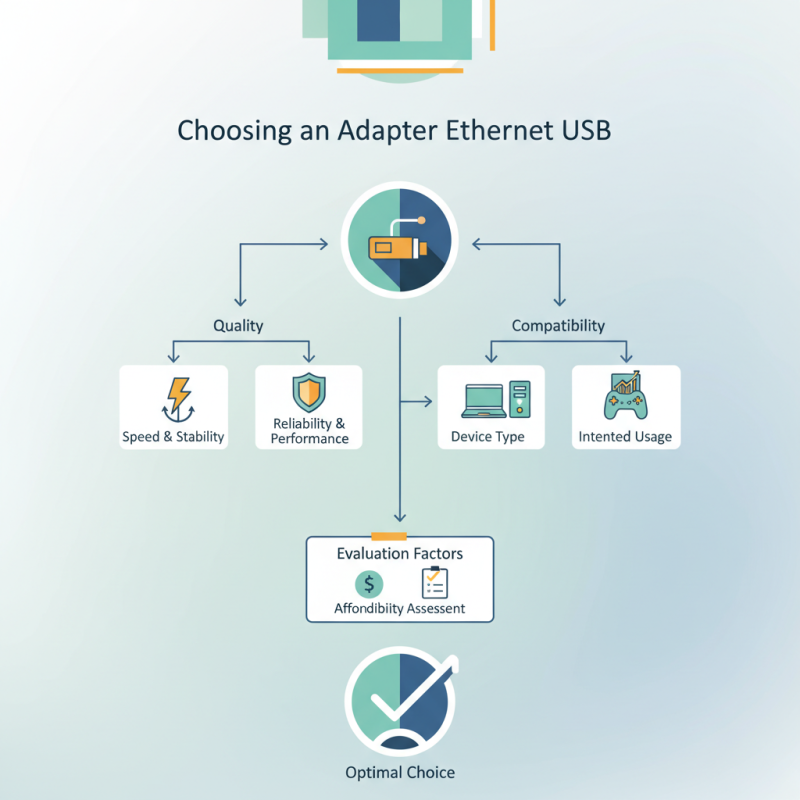
Quality is paramount. A reliable Adapter Ethernet USB can elevate your internet experience, ensuring seamless connectivity for gaming, streaming, or professional work. You may want to consider both speed and stability. Not all adapters deliver consistent performance. Some may lag during high-demand tasks, leading to frustration.
Additionally, the choice depends on your devices and intended usage. Will you use it for a laptop, desktop, or gaming console? Compatibility is essential. While many adapters claim universal support, this may not always hold true. Reflect on your daily needs and seek an adapter that checks all the boxes. Balancing quality with affordability is a continual challenge for many users. Hence, a thoughtful approach is crucial when choosing the best Adapter Ethernet USB for your requirements.
When selecting an Ethernet USB adapter, it helps to understand how they work. These devices connect your laptop or desktop to a wired network. They convert signals, allowing for faster internet speeds than Wi-Fi. This efficiency is crucial for tasks like gaming and video streaming.
Different types of Ethernet USB adapters exist, each designed for various needs. Some adapters support USB 3.0, providing greater bandwidth compared to USB 2.0 options. There are also adapters with multiple ports, enabling connections to various devices simultaneously. Checking compatibility with your operating system is vital. Not all adapters work seamlessly across different platforms.
Installation is often straightforward but can present challenges. Users sometimes encounter driver issues. Updating drivers may resolve connectivity problems. Additionally, physical design matters. A compact adapter is ideal for on-the-go use. Yet, larger models might offer better cooling. Each choice has its benefits and trade-offs, depending on personal preferences and requirements.
When selecting an Ethernet USB adapter, consider several key features. Compatibility is vital. Ensure your device's operating system supports the adapter. Different adapters work better with specific systems. Check reviews to learn about real-world performance.
Speed is another important factor. Data transfer rates can vary widely. Opt for adapters that support higher speeds if you need fast internet connections. Look for USB 3.0 or above for optimal performance. They provide faster data transfer compared to older USB versions.
Consider the physical design, too. Some adapters are compact and portable, ideal for travel. Others may have a more robust design for stationary use. Also, check for additional features like LED indicators. They give visual feedback about connectivity and data transfer status. Ultimately, reflect on your daily usage needs. Choose an adapter that balances performance with convenience.
| Feature | Description | Importance |
|---|---|---|
| USB Type | The type of USB connection (USB 2.0, USB 3.0, USB-C) | High - Affects the speed and compatibility |
| Data Transfer Speed | Maximum speed offered by the adapter (e.g., 10/100 Mbps or Gigabit) | Very High - Determines performance in networking tasks |
| Compatibility | Operating systems and devices the adapter supports | High - Ensures functionality across multiple devices |
| Portability | Size and weight of the adapter for travel ease | Medium - Important for users on the go |
| Build Quality | Materials used and overall durability | High - Affects longevity and reliability |
| Price | Cost of the adapter | Medium - Must balance features and budget |
| Customer Reviews | Feedback from other users regarding performance | Medium - Provides insight into real-world usage |
When selecting an Ethernet USB adapter, understanding the types available can greatly enhance your experience. One common type is the USB 3.0 Ethernet adapter. This option is ideal for users who need fast data transfer speeds. Such devices can support up to 1 Gbps, making them perfect for gaming or streaming. They are compatible with many operating systems, which adds to their versatility.
Another option is the USB-C Ethernet adapter. This type is increasingly popular due to the rise of USB-C ports in modern laptops and tablets. These adapters provide a streamlined connection. They are often compact and easy to carry, making them suitable for mobile professionals. At the same time, not all USB-C adapters support the same speeds. Users should check specifications closely.
There's also the powerline Ethernet adapter. This is a unique option that uses existing electrical wiring to transmit data. It's useful in homes where Wi-Fi signals may be weak. While this method can deliver good speeds, performance might vary depending on your wiring quality. Reflection on your specific needs can help guide your choice.
When selecting an Ethernet USB adapter, compatibility and performance are key. Start by ensuring the adapter works with your operating system. Many adapters support both Windows and macOS, but some may not. Check for driver availability, too. An adapter may seem promising but could compromise performance if drivers aren't updated or compatible.
Performance factors include speed and latency. Look for adapters that support at least USB 3.0. This standard offers faster data transfer rates compared to USB 2.0. Higher speed means better streaming and smoother online gaming. However, keep in mind that your internet speed also plays a crucial role. An adapter can't improve a slow internet connection.
Investing in an Ethernet USB adapter can enhance your internet experience. Yet, ensure your network infrastructure supports it. A high-quality adapter cannot compensate for an outdated router or slow service. It’s worth reflecting on your overall setup for optimal results.
When using an Ethernet USB adapter, proper maintenance is crucial for optimal performance. Regularly check the cables for signs of wear and tear. Damaged wires can cause connectivity issues. A clean connection is essential; keep the ports free from dust and debris.
Troubleshooting might become necessary if issues arise. If your adapter isn’t recognized, try plugging it into a different USB port. Restarting your device can also resolve temporary glitches. Update your drivers to ensure compatibility and performance. Sometimes, older adapters struggle with newer systems, so check for firmware updates.
Don’t ignore overheating; excessive heat can affect performance. Ensure that the device has adequate ventilation. If connectivity speeds are slower than expected, double-check your network settings. Sometimes it’s a simple fix, like resetting the router or reconnecting the adapter.
: It is an adapter that offers fast data transfer, supporting speeds up to 1 Gbps.
Mobile professionals who use modern laptops or tablets with USB-C ports will find these adapters useful.
No, speeds can vary by model. Always check the specifications before purchasing.
It transmits data through existing electrical wiring, great for homes with weak Wi-Fi signals.
Performance may vary based on the quality of the electrical wiring in your home.
Ensure the adapter works with your operating system and that drivers are available.
Higher speeds lead to better streaming and smoother online gaming experiences.
No, a high-quality adapter cannot fix a slow internet speed.
Reflect on your entire network setup, including your router and internet service.
It might be due to outdated drivers, compatibility issues, or insufficient network infrastructure.
When selecting the best Adapter Ethernet USB for your specific needs, it's essential to first understand the various types available and their functionalities. Ethernet USB adapters can greatly enhance your connectivity options, especially for devices lacking built-in Ethernet ports. Key features to consider include speed capabilities, durability, and additional functionalities like multiple ports.
The compatibility and performance of the Adapter Ethernet USB are critical factors, as they can impact your overall internet experience. It's advisable to check for compatibility with your devices and to be aware of potential driver updates. Additionally, maintaining your adapter through proper usage and troubleshooting common issues will ensure it performs optimally. By considering these elements, you can make an informed choice that meets your connectivity requirements effectively.

Taitron Electronics